[{"@context":"https://schema.org","@type":"FAQPage","mainEntity":[{"@type":"Question","name":"Which review platforms should Envision Cloud Management Software users prioritize?","acceptedAnswer":{"@type":"Answer","text":"Google Reviews should be your top priority since most potential clients discover business management services through local search. Focus secondarily on industry-specific platforms like G2, Capterra, or TrustRadius where businesses research software solutions and professional services. LinkedIn recommendations also carry weight in B2B industries. Yelp and Facebook matter for local market visibility. The advantage with Reviewflowz is monitoring all 200+ platforms from one dashboard, so you don't need to choose. You can track reviews across Google, industry platforms, and social media simultaneously while managing responses from a single interface connected to your Envision Cloud workflow."}},{"@type":"Question","name":"How do I calculate my actual review performance in Envision Cloud?","acceptedAnswer":{"@type":"Answer","text":"True review performance is your conversion rate (reviews collected divided by total projects completed), not your raw review count. A business with 100 reviews from 2,000 projects has a 5% rate, while 40 reviews from 400 projects is 10% and likely performs better in search rankings. Reviewflowz automatically calculates this by connecting to your Envision Cloud Management Software project data. You'll see metrics like: 200 projects completed this quarter, 28 reviews collected, 14% conversion rate. This helps you benchmark against our average customer rate of 7.5% and identify whether you need to improve your request timing, messaging, or communication channel selection."}},{"@type":"Question","name":"How do review requests work with Envision Cloud Management Software workflows?","acceptedAnswer":{"@type":"Answer","text":"When you mark a project complete, invoice paid, or milestone delivered in Envision Cloud Management Software, Reviewflowz automatically sends a review request to your client. You configure this once by selecting your trigger event (project completion, final payment, etc.) and communication method (email, SMS, or WhatsApp). The system uses existing client contact information from your Envision database, so there's no additional data entry. Future clients automatically receive review requests without any manual intervention. You can set different triggers for different project types or service categories, and the system handles all timing and delivery automatically through your normal business workflow."}},{"@type":"Question","name":"Can Envision Cloud users send review requests through WhatsApp?","acceptedAnswer":{"@type":"Answer","text":"Yes, Reviewflowz supports WhatsApp review requests that trigger automatically from Envision Cloud Management Software events like project completions or invoice payments. WhatsApp achieves nearly 98% open rates compared to roughly 20% for email, making it highly effective for review collection. The setup process is identical to email and SMS options. You select WhatsApp as your communication method, and the system automatically sends requests using client phone numbers from your Envision database. WhatsApp pricing varies by country but follows the same pay-as-you-go model. Most business management firms see significantly higher response rates with WhatsApp compared to traditional email requests."}},{"@type":"Question","name":"How does team member attribution work with Envision Cloud projects?","acceptedAnswer":{"@type":"Answer","text":"Reviewflowz automatically tracks which team member handled each project by connecting to your Envision Cloud Management Software assignment data. When reviews come in, they're automatically linked to the correct team member without clients needing to mention names. This avoids Google's tendency to flag reviews that specifically mention staff members while still giving you detailed performance tracking. You can run reports showing review performance by team member, project manager, or department. This data helps with employee evaluations, identifying top performers, and understanding which team members consistently generate positive client feedback. All attribution happens behind the scenes using your existing project assignment data."}},{"@type":"Question","name":"How long does Reviewflowz integration take with Envision Cloud?","acceptedAnswer":{"@type":"Answer","text":"Setup takes under 15 minutes with no developer required. You connect your Envision Cloud Management Software account to Reviewflowz, select your trigger events (like project completion or invoice payment), choose your communication method (email, SMS, or WhatsApp), and customize your review request message. The integration is live immediately, and your first automated review request goes out the same day a trigger event occurs. Most business management firms are collecting reviews within 24-48 hours of setup. The system runs automatically in the background of your normal Envision workflow without requiring any changes to how you manage projects or client relationships."}},{"@type":"Question","name":"What do review requests cost for Envision Cloud Management Software users?","acceptedAnswer":{"@type":"Answer","text":"Review requests cost $5 per 1,000 emails or $5 per 100 SMS messages on a pay-as-you-go basis with no monthly minimums or contracts. For most business management firms using Envision Cloud, this translates to just pennies per review collected. If you complete 100 projects monthly and send email requests to each client, that's $0.50 total cost. With our average 7.5% conversion rate, you'd collect about 7-8 reviews for that 50 cents. WhatsApp pricing varies by country but follows the same credit system. You only pay for requests actually sent, so seasonal businesses or those with variable project volumes aren't locked into monthly fees during slower periods."}}]},{"@context":"https://schema.org","@type":"BreadcrumbList","itemListElement":[{"@type":"ListItem","position":1,"name":"Home","item":"https://www.reviewflowz.com/"},{"@type":"ListItem","position":2,"name":"Envision Cloud Management Software","item":"https://www.reviewflowz.com/for/envisioncloudmanagementsoftware"}]}]
Automated review requests from Envision Cloud projects
Reviewflowz sends automatic review requests when you mark projects complete or invoices paid in Envision Cloud Management Software. Choose email ($5 per 1,000), SMS ($5 per 100), or WhatsApp as your delivery method. The system uses existing client data from your Envision workflow, so there's no duplicate data entry or manual tracking required. Set your trigger once (project completion, invoice payment, or milestone delivery) and every future client automatically receives a personalized review request. Your average conversion rate across all methods will be 7.5%, meaning you'll collect about 75 reviews for every 1,000 requests sent through your normal business operations.
Identify your best clients for referrals and testimonials
When clients leave reviews, that feedback data flows directly back into their Envision Cloud Management Software record. You can instantly see which clients are your biggest advocates and which projects generated the most positive feedback. This client intelligence helps you identify the best candidates for video testimonials, case studies, or referral requests. Instead of guessing who might provide a referral, you have concrete data showing which clients already promoted your business publicly. You can also spot patterns in project types or service areas that consistently generate positive reviews, helping you focus your marketing efforts on your most successful work categories.
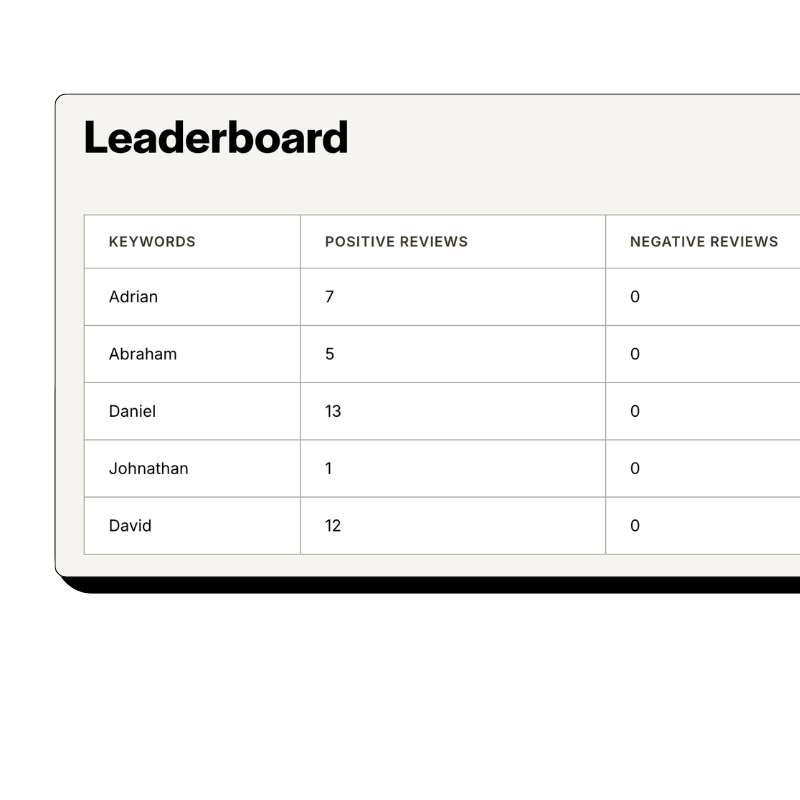
Staff performance tracking without mentioning names in reviews
Reviewflowz automatically attributes reviews to the right team members using data from Envision Cloud Management Software without asking clients to mention names. Google often flags reviews that specifically mention staff members, but our system knows who handled each project from your existing workflow data. When reviews come in, they're automatically connected to the right team member's performance record. This gives you clean attribution data for employee reviews and performance tracking while keeping customer reviews natural and authentic. You get detailed staff performance reports without the risk of reviews being removed for seeming solicited or unnatural.
How serious are you about your reviews?
Get up and running in minutes • Upgrade when you're ready
Track review conversion rates per project, not just totals
Most businesses only count total reviews, but that's meaningless without knowing your project volume. A competitor with 50 reviews from 500 projects has a 10% conversion rate and likely outranks you even if you have 200 reviews from 5,000 projects (4% rate). Reviewflowz connects directly to Envision Cloud Management Software to track your actual project count, calculating your true review conversion rate automatically. You'll see metrics like: 150 projects completed this quarter, 23 reviews collected, 15.3% conversion rate. This data helps you optimize your review strategy and benchmark against industry averages. Our customers average 7.5% conversion across all communication methods.
AI replies to reviews across Google, Yelp, and 200+ platforms
Reviewflowz generates professional replies to every review using AI trained on your business voice and Envision Cloud project data. The system responds across Google, Yelp, Facebook, and 200+ other review platforms automatically. You can approve each reply manually or set them to publish automatically after review. AI responses reference specific project types and services from your Envision workflow, making replies feel personal and relevant. Consistent review responses improve your local search rankings and show potential clients that you actively engage with customer feedback. The system handles both positive reviews (with thanks and project-specific details) and negative reviews (with professional resolution offers).
FAQs
Everything you need to know about the product and billing. Can’t find the answer you’re looking for? Please chat to our team.
Which review platforms should Envision Cloud Management Software users prioritize?
Google Reviews should be your top priority since most potential clients discover business management services through local search. Focus secondarily on industry-specific platforms like G2, Capterra, or TrustRadius where businesses research software solutions and professional services. LinkedIn recommendations also carry weight in B2B industries. Yelp and Facebook matter for local market visibility. The advantage with Reviewflowz is monitoring all 200+ platforms from one dashboard, so you don't need to choose. You can track reviews across Google, industry platforms, and social media simultaneously while managing responses from a single interface connected to your Envision Cloud workflow.
How do I calculate my actual review performance in Envision Cloud?
True review performance is your conversion rate (reviews collected divided by total projects completed), not your raw review count. A business with 100 reviews from 2,000 projects has a 5% rate, while 40 reviews from 400 projects is 10% and likely performs better in search rankings. Reviewflowz automatically calculates this by connecting to your Envision Cloud Management Software project data. You'll see metrics like: 200 projects completed this quarter, 28 reviews collected, 14% conversion rate. This helps you benchmark against our average customer rate of 7.5% and identify whether you need to improve your request timing, messaging, or communication channel selection.
How do review requests work with Envision Cloud Management Software workflows?
When you mark a project complete, invoice paid, or milestone delivered in Envision Cloud Management Software, Reviewflowz automatically sends a review request to your client. You configure this once by selecting your trigger event (project completion, final payment, etc.) and communication method (email, SMS, or WhatsApp). The system uses existing client contact information from your Envision database, so there's no additional data entry. Future clients automatically receive review requests without any manual intervention. You can set different triggers for different project types or service categories, and the system handles all timing and delivery automatically through your normal business workflow.
Can Envision Cloud users send review requests through WhatsApp?
Yes, Reviewflowz supports WhatsApp review requests that trigger automatically from Envision Cloud Management Software events like project completions or invoice payments. WhatsApp achieves nearly 98% open rates compared to roughly 20% for email, making it highly effective for review collection. The setup process is identical to email and SMS options. You select WhatsApp as your communication method, and the system automatically sends requests using client phone numbers from your Envision database. WhatsApp pricing varies by country but follows the same pay-as-you-go model. Most business management firms see significantly higher response rates with WhatsApp compared to traditional email requests.
How does team member attribution work with Envision Cloud projects?
Reviewflowz automatically tracks which team member handled each project by connecting to your Envision Cloud Management Software assignment data. When reviews come in, they're automatically linked to the correct team member without clients needing to mention names. This avoids Google's tendency to flag reviews that specifically mention staff members while still giving you detailed performance tracking. You can run reports showing review performance by team member, project manager, or department. This data helps with employee evaluations, identifying top performers, and understanding which team members consistently generate positive client feedback. All attribution happens behind the scenes using your existing project assignment data.
How long does Reviewflowz integration take with Envision Cloud?
Setup takes under 15 minutes with no developer required. You connect your Envision Cloud Management Software account to Reviewflowz, select your trigger events (like project completion or invoice payment), choose your communication method (email, SMS, or WhatsApp), and customize your review request message. The integration is live immediately, and your first automated review request goes out the same day a trigger event occurs. Most business management firms are collecting reviews within 24-48 hours of setup. The system runs automatically in the background of your normal Envision workflow without requiring any changes to how you manage projects or client relationships.
What do review requests cost for Envision Cloud Management Software users?
Review requests cost $5 per 1,000 emails or $5 per 100 SMS messages on a pay-as-you-go basis with no monthly minimums or contracts. For most business management firms using Envision Cloud, this translates to just pennies per review collected. If you complete 100 projects monthly and send email requests to each client, that's $0.50 total cost. With our average 7.5% conversion rate, you'd collect about 7-8 reviews for that 50 cents. WhatsApp pricing varies by country but follows the same credit system. You only pay for requests actually sent, so seasonal businesses or those with variable project volumes aren't locked into monthly fees during slower periods.